



What Is Vapor Chamber Cooling? How It Works and Why It Matters
Every computer needs a way to move heat away from its processors to prevent temperature spikes that can throttle performance and potentially damage your hardware. That’s especially important for mini PCs, which pack high-performance components into a compact space.
Vapor chamber cooling is one method that mini PCs and other devices can use to distribute heat. In this guide, we’ll dive into vapor chamber cooling to explain how it works and why it’s so important.
Key Takeaways
-
Vapor chamber cooling uses a sealed chamber with fluid inside to transfer heat away from processors in mini PCs, smartphones, and other devices.
-
Vapor chamber cooling helps keep your processor within its normal operating temperature range, preventing thermal throttling and helping to minimize fan noise.
-
Vapor chamber cooling is more efficient at spreading heat and preventing hotspots than heat pipe cooling. It’s especially worthwhile for sustained, intensive computing uses like gaming and creative work.
What Is Vapor Chamber Cooling?
Vapor chamber cooling is a technique for transferring and spreading heat in computers, smartphones, and other devices. It relies on a fluid that’s liquid when cool, but that quickly vaporizes when heated. The transition from liquid to gas allows the fluid to carry heat away from your device’s processor and keep it cool.
Vapor chamber cooling isn’t the most common type of cooling used in today’s devices. But it’s highly efficient at spreading heat and preventing hotspots, so it’s frequently used in high-performance devices that generate a lot of heat or in compact devices that don’t have space for traditional heat sinks and fans.
How Vapor Chamber Cooling Works
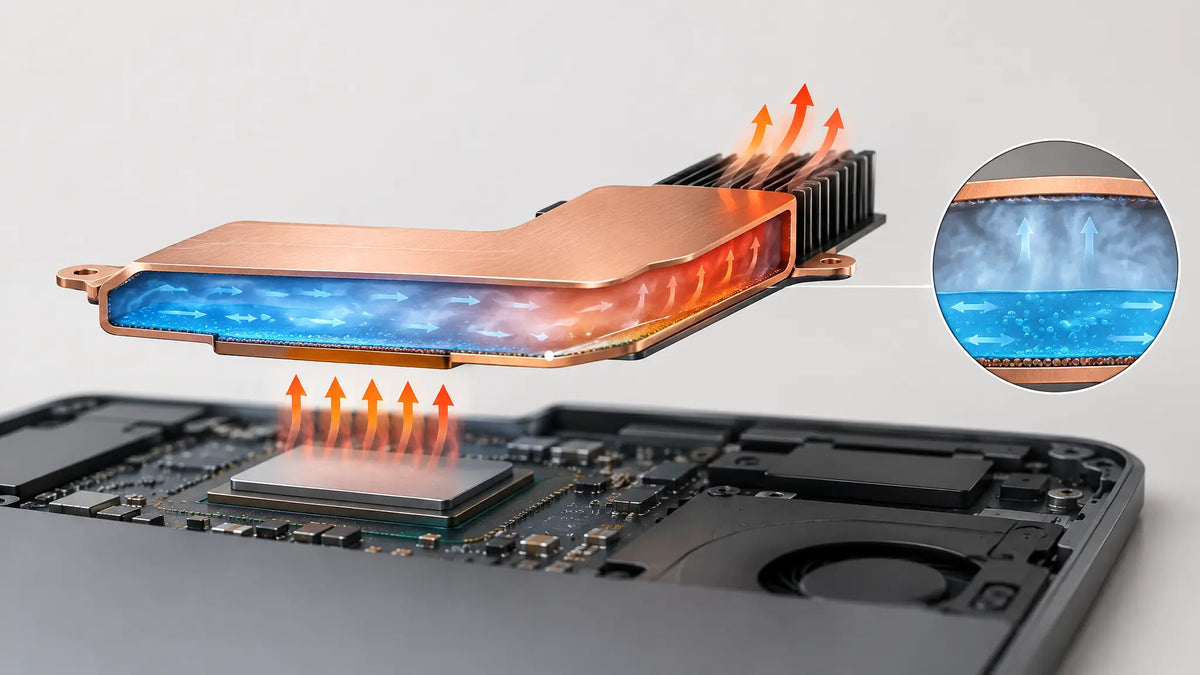
A vapor chamber consists of a sealed metal enclosure containing a small amount of working fluid, a wick structure, and support pillars that help prevent the chamber from collapsing under pressure. The chamber is evacuated before being sealed, allowing the fluid to operate at a suitable temperature and pressure.
When a processor heats the evaporator area of the chamber, the working fluid absorbs heat and evaporates. The resulting vapour moves towards cooler areas inside the chamber, where it condenses and releases its latent heat. That heat passes through the chamber wall to the heatsink or cooling fins, which transfer it to the surrounding air.
The wick then returns the condensed liquid to the heated area through capillary action, allowing the cycle to repeat. This process spreads heat across a larger surface, helping reduce localised hotspots. The vapor chamber itself does not eliminate heat; the surrounding cooling system must ultimately release that heat into the environment.
Vapor Chamber vs. Heat Pipes
Vapor chambers use the same underlying idea of vaporizing and condensing liquid to transfer heat as heat pipes, which are much more commonly used in today’s devices. So, it’s worth exploring the difference between these two cooling approaches and why one may be used over the other.
2D Heat Spreading vs. 1D Heat Transport
The biggest difference between vapor chambers and heat pipes lies in how they move heat. Vapor chambers allow heat to spread laterally across the chamber in two dimensions. Heat pipes move heat through a sealed tube in one dimension.
This significantly impacts heat transfer efficiency and hotspot formation. The 2D spreading action of vapor chambers allows hot gas to move across a larger area, preventing hotspots around the processor. The 1D transport action of heat pipes can move heat away from a source quickly, but the heat is channeled along a narrow tube rather than spread over a wide area.
When Heat Pipes Are Still Enough
Heat pipes can be much less expensive to manufacture than vapor chambers, so they’re still the preferred solution in many devices. For example, they’re found in many home computers that lack high-performance GPUs.
Because of the cost difference, even devices that use vapor chambers for high-performance components usually also rely on heat pipes for other components. A high-powered gaming computer, for instance, might use a vapor chamber to cool the GPU and heat pipes to cool the CPU and motherboard.
Here’s an overview of how vapor chambers and heat pipes compare:
|
Vapor Chambers |
Heat Pipes |
|
|
Typical heat transport |
Spreads heat laterally across a flat area |
Primarily transports heat along a tube |
|
Hotspot management |
Well suited to spreading localised heat across a wider surface |
Effective at moving heat away from a source along a defined path |
|
Form factor |
Often flat and suitable for low-profile designs |
Typically tubular, although flattened designs are also available |
|
Manufacturing Cost |
Often higher, depending on design and production volume |
Often lower for comparable applications |
|
Typical Use Cases |
Compact systems where heat needs to spread across a broad contact area |
Systems that need to transport heat to a separate heatsink |
Vapor Chamber Cooling vs. Liquid Cooling
While vapor chambers are very efficient, they’re no match for liquid cooling in devices that generate very large quantities of heat. Liquid cooling uses pumps to actively push cool liquid towards a heat source, then cycle the heated liquid to a radiator to dump the heat.
A key drawback to liquid cooling is that it requires pumps, which add complexity. Pumps also involve moving parts that can fail over time, causing your device to overheat.
Liquid cooling systems also take up significantly more space than vapor chamber systems. In addition to pumps and a radiator, which take up a fair amount of space, they also require bulky tubes to move liquid back and forth between a heat source and radiator. So, they’re not suitable for space-constrained devices like mini PCs and smartphones. Mini PCs that need advanced cooling typically use a vapor chamber to spread heat and a fan to eliminate heat.
How Vapor Chamber Cooling Affects Performance
Ultimately, the goal of vapor chamber cooling is to keep your hardware cool so it can function at maximum efficiency. So, it’s important to understand exactly how vapor chamber cooling impacts your device’s performance.
Can It Help Prevent Thermal Throttling?
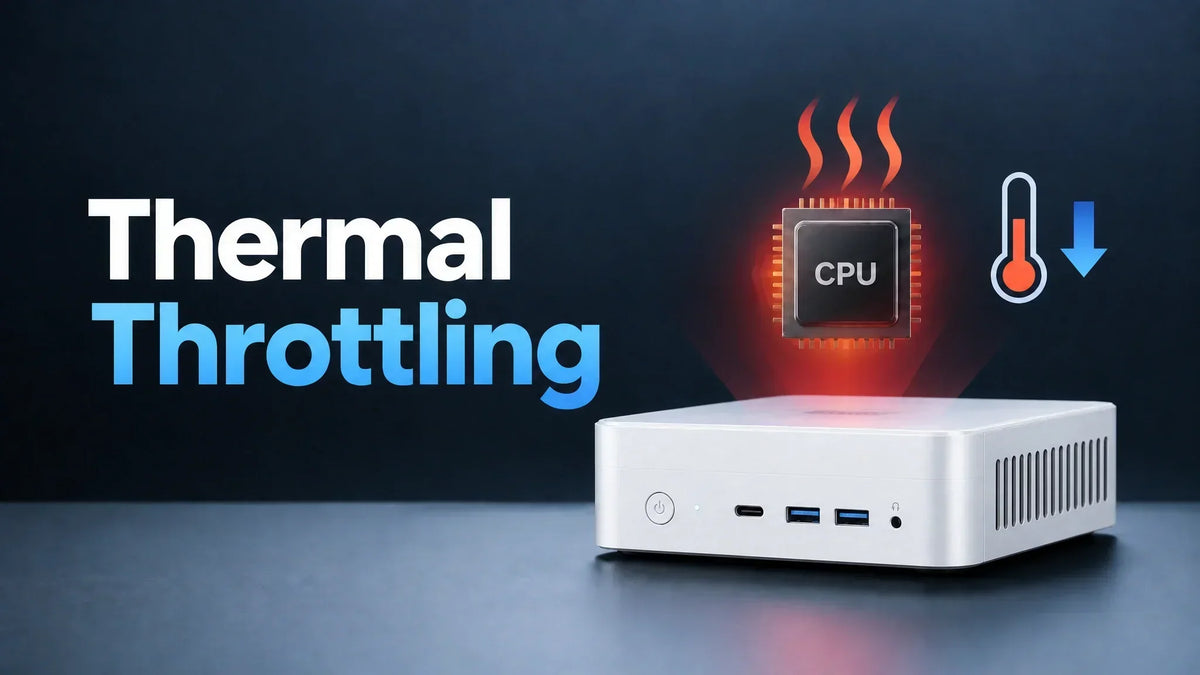
Thermal throttling occurs when a processor reduces its clock speed or power consumption to manage excessive temperatures. By spreading heat away from the processor and reducing hotspots, a vapor chamber can help limit temperature-related throttling under sustained workloads.
However, temperature is not the only factor that determines processor performance. Power limits, current limits, firmware settings and workload characteristics also affect how long a processor can maintain its boost clocks. Even with effective cooling, a processor may reduce its clock speed once it reaches its configured power limit.
For this reason, a vapor chamber should be viewed as one part of the cooling system, not a guarantee of maximum performance. Sustained clock speeds, temperatures and power consumption under realistic workloads provide a more useful assessment than cooling hardware alone.
Does It Make a Mini PC Quieter?
Vapor chamber cooling can also help keep your computer quieter. When a hotspot develops around your processor, a mini PC’s fans need to spin fast to pull heat away from that localized area. But vapor chamber cooling is very effective at spreading heat and preventing hotspots, so fans can spin at lower speeds and make less noise.
That said, what RPM your device’s fans run at will depend on the full system design. Vapor chamber cooling helps reduce fan noise, but it’s not the only factor at play.
Why Sustained Performance Matters More Than Peak Benchmarks
When comparing cooling systems, it’s important to look at how they perform over time, not just peak performance benchmarks.
During a peak performance test, a processor might generate huge amounts of heat, but the cooling system is starting cold and the temperature is well below the throttling limit. In real-world conditions, your processor has likely been running for some time already, so the processor, the fluid in your cooling system, and the heat sinks in your device are already warm.
That means that an under-cooled device might look great in a burst test, but suffer thermal throttling once it’s been handling heavy workloads for 15 minutes. Whether your cooling system can keep the processor below its thermal throttling limit under sustained workloads is ultimately what determines whether it’s suitable for your device.
What Vapor Chamber Cooling Can't Fix
While vapor chamber cooling is highly efficient, it’s not a one-size-fits-all solution for every device.
Crucially, vapor chambers only spread heat, they don’t eliminate it. In order to work properly, vapor chambers need a place to dump heat where it can then be more permanently removed from the area of the processor. If a device operates in a hot environment, heat elimination efficiency is reduced and internal temperature is likely to be higher regardless of a vapor chamber’s spreading action.
Vapor chambers also need to be large enough to handle the quantities of heat that a processor produces. If they lack sufficient capacity, heat will build up and the temperature will eventually rise past the processor’s thermal throttling limit.
Another consideration is that while vapor chambers are effective at spreading heat in two dimensions, they aren’t as good as heat pipes or liquid cooling systems at moving heat over long distances. So, vapor chamber cooling may be less suitable if you need to move heat to a radiator or fan that’s physically far from a device’s processor.
Is Vapor Chamber Cooling Worth It for a Mini PC?
Vapor chamber cooling can be worthwhile for high-performance mini PCs that frequently operate under heavy workloads. For example, if you use your mini PC for long gaming sessions, heavy-duty multitasking, creative work, or AI inference, vapor chamber cooling is a good solution for cooling your device and keeping it below its thermal limit.
For mini PCs that are mainly used for low-intensity workloads, like light office work or surfing the web, vapor chamber cooling may not be necessary.
FAQs
Is vapor chamber cooling better than heat pipes?
Vapor chamber cooling is more efficient at spreading heat and preventing hotspots than heat pipe cooling. This is thanks to a vapor chamber’s ability to spread heat in two dimensions. However, vapor chambers are more expensive to manufacture, so they add cost to devices.
Does vapor chamber cooling reduce CPU temperatures?
Vapor chamber cooling is very effective at spreading heat away from a CPU and preventing hotspots from forming during heavy workloads. This keeps your CPU from overheating during long gaming sessions or intensive multi-tasking. Importantly, heat that is spread by a vapor chamber must still be eliminated from the device, usually by a radiator fin and fan, to prevent temperature increases.
Is vapor chamber cooling worth it for everyday use?
Vapor chamber cooling often isn’t necessary for computers with mid-performance processors that are typically used for low-intensity workloads. Vapor chambers are more worthwhile in high-performance devices that operate under heavy workloads.
Does a vapor chamber work if the PC is mounted vertically?
Some vapor chamber cooling systems can struggle in vertically-mounted PCs because gravity interferes with the wicking process that returns cooled liquid to the hottest part of the chamber. However, modern vapor chambers use sintered wicks that function reliably even when oriented vertically.
How long does a vapor chamber last?
Vapor chambers have no moving parts and are fully sealed systems. So, they typically last as long or longer than other computer hardware.
Can a vapor chamber fail?
Yes, a vapor chamber can fail if the seal that traps fluid inside is compromised or if the chamber itself is physically damaged. However, it’s very uncommon for vapor chambers to fail.
Can you add a vapor chamber to a Mini PC that doesn't have one?
It is typically not possible to add a vapor chamber to a mini PC that doesn’t already have one. The space around mini PC processors is very tight, and vapor chambers must fit perfectly against a processor in order to cool it effectively.
Does vapor chamber cooling require a fan?
Vapor chamber cooling doesn’t necessarily require a fan, but it depends on the device design. Some devices transfer heat from a vapor chamber to a radiator fin or outer casing without the use of fans. Other devices, like high-powered mini PCs, use fans to more rapidly eliminate heat that has been transferred by a vapor chamber.

VZMORE is a leading manufacturer of AI Mini PCs. Our systems combine whisper-quiet VC cooling, high performance, and intelligent AI processing power—tailored for demanding applications in home offices, creative workflows, and edge computing. Enjoy free shipping on all orders.
Related Articles
Subscribe to Newsletter
Get the latest news, product updates, and exclusive offers delivered straight to your inbox.