



Why Is My Mini PC So Loud? Causes and Fixes
Key Takeaways
• Small fans have to spin much faster than large ones to move the same amount of air, and that’s exactly what makes them audible.
• The decibel scale is logarithmic. An increase of just 10 dB sounds roughly twice as loud to the human ear.
• Common culprits include undersized heatsinks, dust, poor placement, and aggressive factory fan curves.
• Modern vapor chamber cooling spreads heat over a large area, allowing the fan to run at lower speeds.
• Under U.S. workplace safety rules, hearing-protection requirements don’t kick in until 85 dBA. Your concentration, however, suffers well below that threshold.
• Better placement, regular cleaning, and adjusted power settings can often reduce noise noticeably, no tools required.
How Loud Is “Loud”? The Decibel Scale, Explained
Sound levels are measured in decibels (dB). For everyday noise, you’ll usually see the unit dBA. The “A” refers to a weighting curve that mimics how sensitive the human ear is to different frequencies. In other words, a sound level meter filters its reading so the number reflects what you actually hear. The scale itself is logarithmic, running from 0 dB at the threshold of hearing to about 130 dB at the threshold of pain.
In practice, this logarithmic scale leads to a surprising result. Your ear perceives a 10 dB increase as a doubling of loudness, so a computer running at 48 dB sounds roughly twice as loud to you as one at 38 dB. Comparing these numbers with everyday sounds helps put them in perspective: 30 dBA is about the level of a whisper or a quietly ticking clock, 40 dBA a quiet residential street, 50 dBA normal conversation, and 60 dBA a conversation at about 3 feet. A Mini PC that stays at 38 dBA under load falls somewhere between a whisper and a quiet side street. A device that ramps up to nearly 50 dBA, on the other hand, is already competing with your own voice.
The Most Common Causes of a Loud Mini PC
It may seem paradoxical that the smallest computers often make the most noticeable noise. But there’s a simple rule behind it: the less room there is for cooling, the harder the hardware inside has to work. Four causes come up again and again.
Heatsinks That Are Too Small or Inefficient
A heatsink releases heat into the air through its surface area, but in a case the size of a lunchbox, that surface area is inevitably limited. Where a tower PC can fit massive aluminum fins, a Mini PC often has little more than a flat metal plate over the processor. The result is heat buildup that the fan has to offset by spinning faster. Energy-efficient processors ease the problem but don’t eliminate it once there’s a sustained workload.
Fans That Have to Ramp Up Under Full Load
The second factor is the fan itself. The area a fan’s blades sweep grows with the square of its diameter. That’s why a 120 mm fan in a desktop case moves more air at a leisurely speed than a tiny 50 mm fan running flat out. Small fans also produce a higher-pitched sound that many people find especially irritating. When video editing, gaming, or AI applications push the processor for extended periods, the fan speeds up and stays there until the load drops again.
Dust and Poor Airflow Inside the Case
Dust causes problems in two ways. It forms an insulating layer on the cooling fins while also blocking airflow through the narrow vents. The cooling system loses effectiveness, temperatures rise, and the fan control responds by increasing fan speed. If your device has become noticeably louder after a year, clogged air intakes are often the simple explanation. Aging thermal paste between the processor and the cooler also hurts heat transfer, with the same result.
Poor Placement (e.g., on Carpet or Right Against a Wall)
Many Mini PCs draw in fresh air from the bottom or the back. If the device sits on carpet, the intake vents sink into the pile. If it’s pushed right up against a wall or tucked away inside a closed TV cabinet, air barely circulates, and the warm exhaust gets pulled right back in. The computer ends up fighting its own waste heat, and that’s exactly what you hear.
What Role Does Internal Cooling Technology Play?
Whether a compact computer stays quiet is largely decided on the inside. Traditionally, heat is carried away by a heat pipe: a thin, hermetically sealed tube containing a small amount of liquid. At the hot end above the processor, the liquid evaporates; at the cool end, it condenses and flows back through a wick structure. This cycle moves heat many times more effectively than solid metal. A vapor chamber takes the same principle and expands it from a line to a flat surface. Inside a flat chamber, vapor spreads out in every direction, evening out hot spots and making full use of the available cooling surface. As a result, the fan can run slower and more steadily.
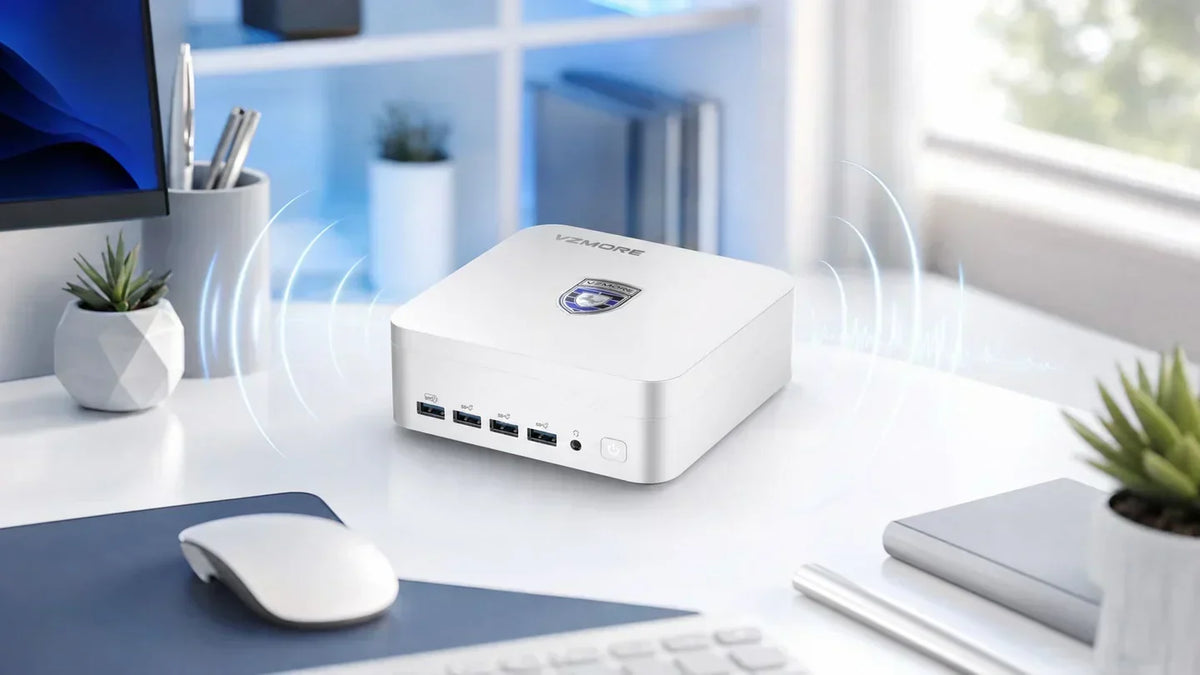
VZMORE, a brand specializing in quiet Mini PCs, shows how this works in a real product. Its V-Cooling architecture combines a large vapor chamber with a 360-degree air intake on the bottom that draws in fresh air from all directions, plus a low-vibration fan with smart fan control. Working together, these components reduce the fan speed needed, because the heat is already spread out by the time the airflow carries it away. For a long time, this kind of cooling technology was reserved for high-end laptops; it has only started making its way into compact desktops in the last few years.
When Does Noise Become a Health Concern?
The short answer first: a Mini PC won’t damage your hearing. In the U.S., OSHA’s occupational noise standard requires employers to run a hearing conservation program once workers are exposed to an 8-hour average of 85 dBA or more. Even the loudest compact computer comes nowhere close to that.
Noise can still become unpleasant much sooner, though. Research published by the U.S. National Institutes of Health describes noise as a stressor that activates the autonomic nervous system and the endocrine (hormonal) system, and these reactions occur even at levels that don’t harm your hearing. For computer work, there’s also a concrete benchmark: Germany’s workplace regulations (ASR A3.7) cap the noise level for tasks requiring a high level of concentration at 55 dBA. So a constant hum just below speaking volume, right next to your keyboard, can genuinely interfere with focused work, whether you’re in a home office or at the office. If you spend several hours a day next to your computer, you have good reason to pay attention to how loud it is.
Practical Fixes: How to Make Your Mini PC Quieter
Before you think about buying a new device, it’s worth checking four things. Often, they’re enough to turn an annoying, constantly whirring machine back into an inconspicuous roommate.
Optimize Placement
Give the case some breathing room. Two to four inches of clearance from walls and furniture on every side with vents is considered the minimum. A hard, smooth surface keeps the bottom intake vents clear, so carpet and fabric are off-limits. Closed cabinet compartments are out too, since waste heat builds up inside them. It also simply helps to put more distance between the device and your ears. A computer placed behind your monitor or at the edge of your desk immediately sounds quieter, without anything changing technically.
Clean and Maintain It Regularly
Every six to twelve months, blow out the vents and visible cooling fins with a can of compressed air, and more often if you have pets or carpeting. Hold the fan in place while you do this so it doesn’t overspin. A thorough internal cleaning or fresh thermal paste requires opening the case. Check the manufacturer’s warranty terms first, since some require an authorized service provider for this.
Look for Efficient Internal Cooling When You Buy
If a device is loud by design, maintenance will only get you so far. That’s why it pays to take a close look at the cooling design when buying a new one. In independent measurements, conventional Mini PCs sometimes exceed 45 dBA under full load, which is already close to normal conversation. The VZMORE AX9 Max with vapor chamber cooling shows how much lower it can go. The manufacturer rates it at 38 dB, and that’s in the highest of its three performance modes at 65 watts. A difference of around 10 dB may sound modest on paper, but on the logarithmic scale it roughly cuts the perceived loudness in half.
Adjust Fan Curves and Power Settings in Software
The most effective quick fix doesn’t cost a thing. Simply switch the Windows power mode from “Best performance” to “Balanced” or “Best power efficiency.” The processor then runs at more conservative clock speeds, produces less heat, and the fan calms down. The BIOS or UEFI lets you go a step further. Many devices let you soften the fan curve there, for example by lowering the minimum fan speed or raising the temperature threshold at which the fan kicks in. Lowering the power limit (TDP, the processor’s maximum power draw) also noticeably reduces heat, usually without any noticeable slowdown in everyday use. It’s also worth checking Task Manager: a single process constantly maxing out one core is enough to keep the fan running nonstop.
What to Look for When Buying a Quiet Mini PC
If you want to avoid noise from the start, the best time to set yourself up for success is when you buy. These criteria have proven to be reliable guides:
• A specific dBA rating from the manufacturer, ideally with the operating mode stated. If there’s no number at all, be skeptical.
• Cooling design: A vapor chamber or generously sized heat pipes point to lower fan speeds.
• Large air intakes instead of a few narrow slits, ideally on multiple sides of the case.
• Selectable performance modes that let you balance noise and performance for the task at hand.
• Performance headroom: A processor that runs at only half capacity in everyday use stays cooler, and therefore quieter, than one that’s barely keeping up.
• Reviews with actual measurements, since manufacturer specs are measured under ideal conditions.
For an overview of current models with vapor chamber cooling, check out VZMORE’s Mini PC lineup.
Frequently Asked Questions
How many decibels is a typical Mini PC?
There’s no one-size-fits-all number, because the range is too wide. Very quiet models stay below 30 dBA at idle and are barely audible from a normal seating distance, while noisier ones already reach around 35 dBA with no load. Under full load, the range spans roughly 30 to 48 dBA, depending on the model and measurement distance. Levels measured right at the case are significantly higher than readings taken from about 3 feet (1 meter) away, so pay attention to the measurement conditions when comparing.
Is a loud fan a sign that something is broken?
In most cases, no. Dust, a background process that never stops running, or simply heavy workloads are far more common explanations. Pay attention, though, if you hear grinding or rattling noises that get louder over several weeks. That points to a worn-out fan bearing, and in the long run the only fix is replacing the fan.
Can you replace a Mini PC’s fan?
In principle, yes, but many manufacturers use model-specific fans in non-standard sizes. In that case, replacement parts are only available directly from the manufacturer or through specialized retailers, and standard aftermarket PC fans rarely fit. Also check the warranty terms before opening the case, since policies vary widely from brand to brand.
Which Mini PCs are considered especially quiet?
The quietest are passively cooled, fanless models, but they only work with low-power processors or reduced performance. For high-performance models, cooling technology makes the difference. Devices with a vapor chamber, large air intakes, and a selectable silent mode generally stay well below the 40 dBA mark, and well-engineered systems hold around 38 dBA even under heavy load.
Conclusion
A loud Mini PC is rarely broken. More often, it’s overworked, dusty, or poorly placed. Once you know how to read decibel numbers, you can quickly tell whether your device is operating in the normal range or is genuinely out of line. Many noise problems disappear with better placement and clean vents, and a gentler power profile often helps too. If your computer is still loud after that, or you’re in the market for a new one anyway, cooling technology is the way forward. With a large vapor chamber and well-designed airflow, even a compact case can stay pleasantly quiet under load.

VZMORE is a leading manufacturer of AI Mini PCs. Our systems combine whisper-quiet VC cooling, high performance, and intelligent AI processing power—tailored for demanding applications in home offices, creative workflows, and edge computing. Enjoy free shipping on all orders.
Related Articles
Subscribe to Newsletter
Get the latest news, product updates, and exclusive offers delivered straight to your inbox.